
 Save ৳50
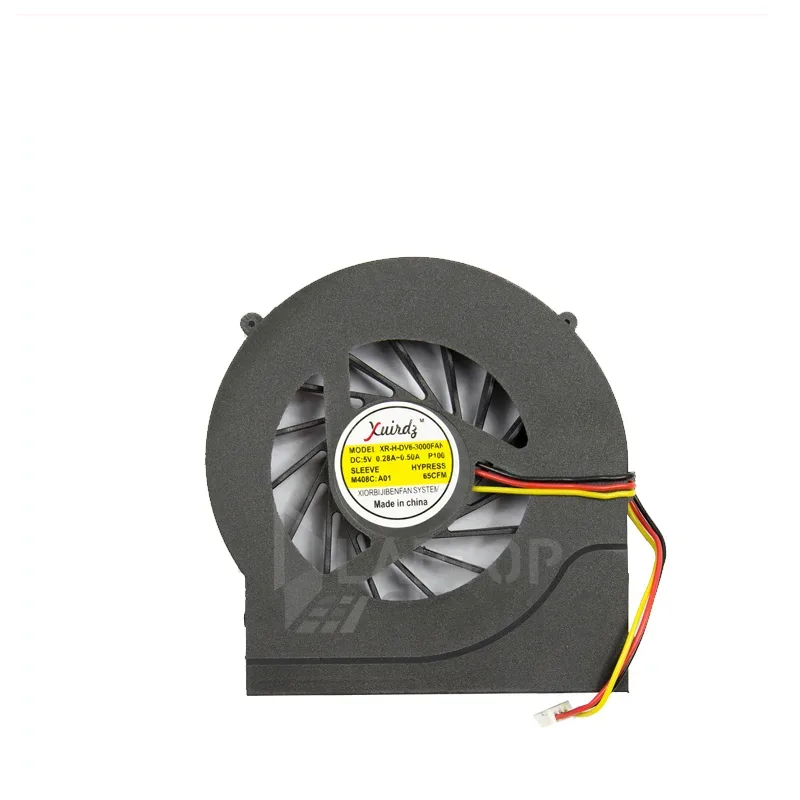
HP DV6-3000 Laptop CPU Cooling Fan (DV7, DV7-4000, 3018TX, 3152TX)
Write the first reviewModel HP DV6-3000 Cooling FanSKU HP-HPDV63000COOLINGFAN
৳700৳7507% off
In stock — ready to ship
Key features
- Type: Internal CPU cooling fan
- Fits: HP dv6-3000, 3018tx, 3152tx, dv7, dv7-4000
- Condition: Brand new
- Connector: Attached, ready to fit
- Use: Fixes overheating and loud fan noise
- DeliveryAll over Bangladesh · charge shown at checkout
- No warrantyPlease check the product at delivery
- Store pickupElephant Road, Dhaka
Specification
General
- Brand
- HP
- Product Type
- Laptop CPU cooling fan
- Condition
- Brand new
Compatibility
- Models
- HP dv6-3000, 3018tx, 3152tx, dv7, dv7-4000
Description
HP DV6-3000 Laptop CPU Cooling Fan
An overheating laptop slows down, gets loud and may shut off without warning. A new hp dv6-3000 cooling fan replaces a noisy or dead CPU fan so air flows over the heatsink again and the processor stays cool under load.
Key Features
- Brand new internal CPU cooling fan
- Listed for HP dv6-3000, 3018tx, 3152tx, dv7 and dv7-4000
- Pushes hot air out through the laptop vent
- Helps stop thermal slowdowns and sudden shutdowns
- Ready to fit, with the connector already attached
Signs Your Cooling Fan Needs Replacing
Watch for a loud grinding or rattling noise, a fan that never spins, very hot palm rests, or a laptop that restarts when you open heavy programs. A message about fan error at start-up is another clear sign. Cleaning dust may help, but a worn bearing needs a new fan.
Why Replace It Early
Heat is the main enemy of laptop parts. A weak fan lets the processor, graphics chip and battery run hot for months, and that shortens their life. Changing the fan is far cheaper than replacing a damaged motherboard, so act as soon as you notice louder noise or higher temperatures.
Compatible Models
This fan is listed for the HP dv6-3000, 3018tx, 3152tx, dv7 and dv7-4000 laptops. Check the model label under your laptop before you order, because fan connectors and sizes differ between series.
Installation Tips
Turn off the laptop, unplug the charger and remove the battery if it is removable. Open the bottom cover, unplug the fan cable, remove the fan screws and lift the old fan out. Fit the new fan, reconnect the cable, and apply fresh thermal paste if you lift the heatsink. Many buyers ask a technician to do this job.
Buy From QASWATEC
QASWATEC on Elephant Road, Dhaka, has supplied laptop parts since 2010. Our staff can confirm the fan for your model before you buy. Visit the showroom or order online for delivery across Bangladesh.
Questions about this product
Which laptops does this cooling fan fit?
It is listed for the HP dv6-3000, 3018tx, 3152tx, dv7 and dv7-4000 laptops. Check the model label under your laptop before ordering.
How do I know my laptop fan is faulty?
A grinding noise, a fan that does not spin, or a laptop that overheats and shuts down are common signs of a failing fan.
Is this cooling fan brand new?
Yes, it is listed as a brand new internal CPU cooling fan.
Can QASWATEC help confirm compatibility?
Yes. Visit us on Elephant Road, Dhaka, or send a photo of your laptop label and old fan and our team will confirm the match.
Another question? Ask our team — we reply within one working day.
People also search for
Reviews
No reviews yet. Bought this from us? Tell other buyers how it works for you.
Write a review
Similar products
৳700৳750