
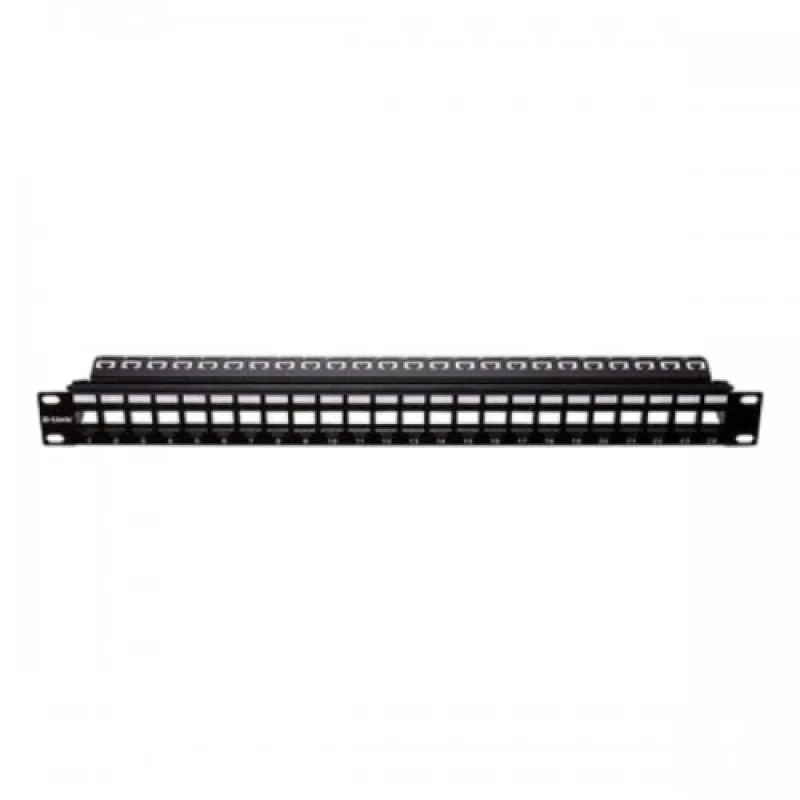
D-Link NPP-AL1BLK241 24-Port Unloaded Modular Patch Panel, 1U
Write the first reviewModel NPP-AL1BLK241SKU DLINK-NPPAL1BLK241
৳7,000
Only a few left
Key features
- Model: D-Link NPP-AL1BLK241
- Ports: 24, unloaded (jacks not included)
- Accepts Cat5e and Cat6 keystone jacks
- Rear cable management bar
- Certification: UL and RoHS
- Mounting: Standard 19-inch rack
- DeliveryAll over Bangladesh · charge shown at checkout
- No warrantyPlease check the product at delivery
- Store pickupElephant Road, Dhaka
Specification
General
- Type
- Modular patch panel, unloaded
- Ports
- 24
- Model
- NPP-AL1BLK241
Compatibility
- Jack Compatibility
- Cat5e and Cat6 keystone jacks
- Mounting
- Standard 19-inch rack
Features
- Cable Management
- Cable management bar
Compliance
- Certification
- UL, RoHS
Description
D-Link NPP-AL1BLK241 24-Port Modular Patch Panel
See the D-Link 24 port patch panel price in BD on this page. A patch panel is where all the building's permanent network cables end inside the rack. The NPP-AL1BLK241 is a modular, unloaded panel: it comes without jacks, so you fit the keystone jacks your project needs, Cat5e or Cat6, in any mix.
Key features
- 24 keystone ports in a 19-inch rack panel
- Accepts Cat5e and Cat6 keystone jacks
- Rear cable management bar to support and tie cables
- UL and RoHS certified
- Modular: replace a single jack without re-terminating the whole panel
Why choose a modular panel
With a modular panel, each port is an independent jack. You can mix data and phone jacks, use coloured jacks to mark cameras or uplinks, and replace a damaged port in minutes. Unused ports can stay empty until needed.
Build a complete D-Link rack
Load it with D-Link NKJ-C6WHI1B21 Cat6 keystone jacks and add a D-Link NCM-XX01-B cable manager below it, then connect to the switch with short Cat6 patch cords.
Where to use it
Office and branch network racks, server rooms, school labs and CCTV systems where many cables need a clean termination point.
Installation tips
- Terminate the cables on the keystone jacks first.
- Snap the jacks into the panel and tie cables to the rear bar.
- Number the ports to match the wall outlet labels.
- Test each link from outlet to panel.
Buy from QASWATEC
QASWATEC supplies genuine D-Link cabling products. Visit our Elephant Road, Dhaka showroom or order online for delivery across Bangladesh.
Questions about this product
Does the D-Link NPP-AL1BLK241 include jacks?
No. It is an unloaded modular panel; keystone jacks are bought separately.
Which jacks fit the D-Link 24 port patch panel?
It accepts Cat5e and Cat6 keystone jacks.
How many ports does it have?
24.
Does it have cable management?
Yes. It has a cable management bar.
Another question? Ask our team — we reply within one working day.
People also search for
Reviews
No reviews yet. Bought this from us? Tell other buyers how it works for you.
Write a review
Similar products
Pro Tech
Pro Tech PTN-C6-CCAM-IN-WH Cat6 UTP Cable, 305 Meter, 250MHz, Flame-Retardant PVC, White
0.0 (0)
৳4,900
In stock
Cudy
Cudy FS1010PG 8 Port PoE+ Switch with 2 Uplink Ports, 120W, CCTV and VLAN
0.0 (0)
৳4,000৳4,500
In stock

৳7,000